
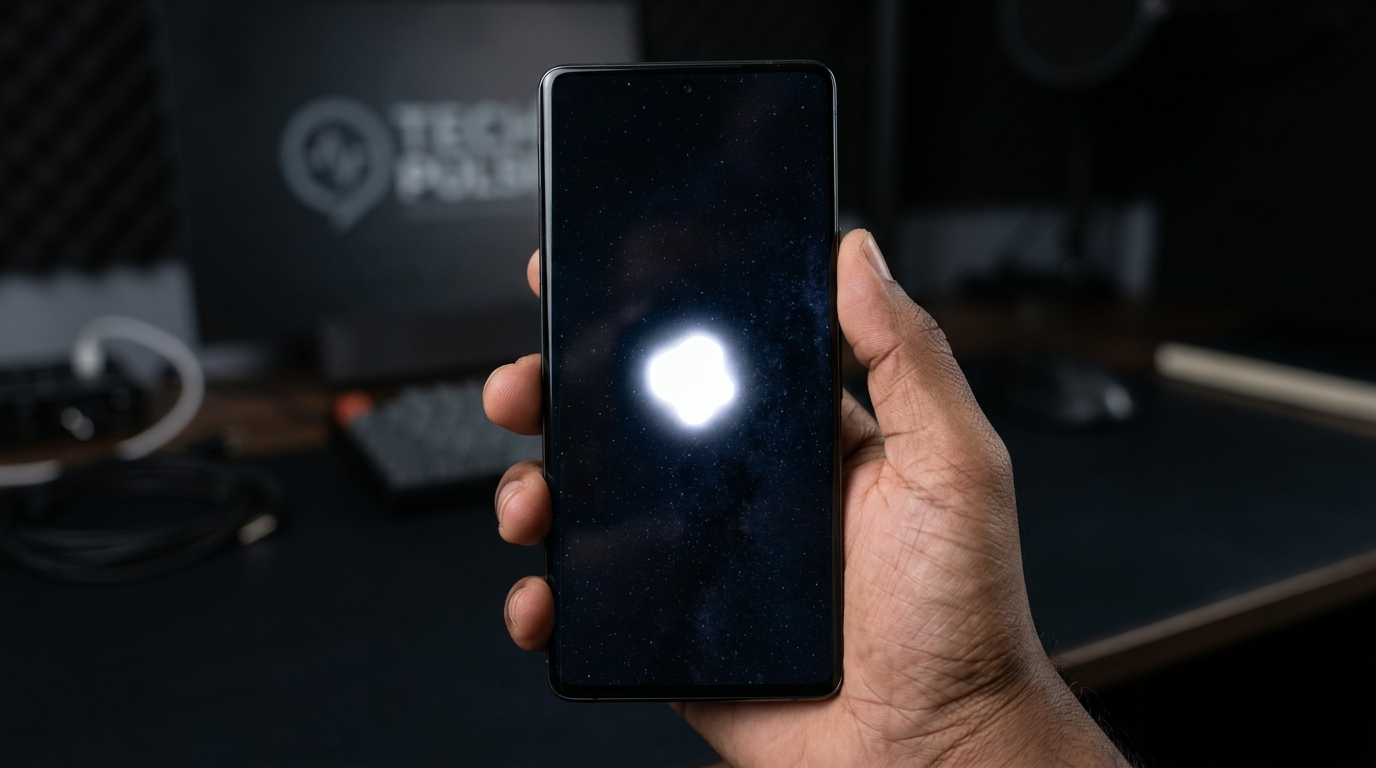
You look at your phone and spot a bright white blob that was not there yesterday. Your mind jumps straight to the worst case: cracked display, expensive repair, or a phone that is about to die.
Here is the truth: most white spots are caused by something simple, and many of them can be fixed at home for free.
This guide covers every cause, every fix, and exactly how much a professional repair costs in 2026 so you can make a smart decision without guessing.
Quick Test: Take a screenshot of the white spot. If it shows up in the screenshot, the problem is software. If it does NOT show up, the problem is hardware. This changes which fix you should try.
What Are White Spots on a Phone Screen?

White spots are areas where the display shows bright or washed-out pixels no matter what is on the screen. They come in different shapes and each shape points to a different cause.
A tiny sharp dot is usually a stuck pixel. A glowing ring or halo points to backlight damage. A large cloudy blob often means pressure or moisture damage. A bubble-like raised patch could be air under your screen protector or a swollen battery.
Identifying the shape first saves you from trying the wrong fix.
LCD vs OLED: Budget phones (Samsung A-series, Redmi, Moto G) use LCD screens and get pressure or backlight spots most often. Premium phones (iPhone X and above, Galaxy S-series, Pixel 6+) use OLED and are more prone to stuck pixels instead.
7 Common Causes of White Spots on Mobile Screens

Here are the seven most common reasons a white spot appears and how to recognize each one.
Pressure Damage
Pressure damage is widely reported as the most common cause of white spots on phone screens.. It happens when something presses too hard on your LCD: sitting on your phone, a heavy bag, a tight case, or keys in the same pocket.
The liquid crystals inside the display get physically displaced, creating a bright patch. Quick test: gently press the back of the phone near the spot. If it shifts or distorts, pressure damage is confirmed.
Good news: if you remove the pressure source, these spots sometimes disappear on their own within 24 to 72 hours.
Backlight or LCD Layer Damage
LCD screens have a backlight behind them. If that backlight or its diffuser layer gets damaged from a drop or internal impact, it creates a glowing ring or halo-shaped white area. This type looks like a bright circle with slightly darker edges.
Backlight damage does not fix itself. It usually requires a full screen replacement.
Stuck or Hot Pixels
A stuck pixel is frozen in the on state, showing white or bright regardless of what the screen is displaying. It looks like a very small, sharp dot with just one or a tiny cluster of pixels.
Stuck pixels are more common on OLED screens and often respond to pixel-fixing apps.
Water or Moisture Damage
Even water-resistant phones can get moisture-related white spots from heavy rain, steam, or condensation. A frequently missed cause in 2026: leaving your phone in a freezing car then bringing it indoors. The temperature shift creates condensation inside the display.
Moisture spots look blurry and cloud-like rather than sharp. Mild cases can sometimes resolve with proper drying. Severe cases need professional repair.
Air Bubbles Under Screen Protector
This one is not a screen problem at all. It just looks like one. Air bubbles trapped under a tempered glass or plastic protector can create bright patches that mimic display damage.
Simple check: peel back a corner of the screen protector. If the spot disappears, your screen is perfectly fine.
Swollen Battery
| Safety Warning: A swollen battery is a fire and explosion hazard. Do not attempt any DIY fix on a phone showing these signs. |
A bloated battery expands inside the phone and physically pushes against the screen from behind. Look for these signs alongside the white spot: a slightly raised or curved back cover, the phone feeling warm when idle, or unexpected shutdowns.
If you see any of these, stop charging the phone and take it to a professional immediately.
Manufacturing Defect
If your phone is brand new and the white spot appeared under normal use with no drops or damage, it is likely a factory defect. In 2025 and 2026, multiple smartphone brands processed large warranty batches for display defects that appeared under regular use.
This is covered under your manufacturer’s one-year warranty. You should not pay a single dollar to fix it.
Quick Diagnosis Guide: What Type of Spot Do You Have?

| What It Looks Like | Likely Cause | What to Do |
| Tiny sharp white dot | Stuck pixel | Pixel fixer app |
| Glowing ring or halo | Backlight damage | Professional repair |
| Cloudy blob or spreading patch | Pressure or moisture | Pressure fix or drying |
| Bubble under screen | Screen protector air | Remove and replace protector |
| Bubble plus bulging back cover | Swollen battery (URGENT) | Professional help now |
| New phone, no damage | Manufacturing defect | Warranty claim |
How to Fix White Spots on Your Phone Screen: 8 DIY Methods

Start from Fix 1 and work your way down. Begin with the easiest and safest option first. If you suspect a swollen battery, skip all of these and go straight to a professional.
Remove Your Case and Screen Protector
This is the first step every time and it costs nothing. Take off the case and screen protector completely. Leave the phone on a flat surface for 24 to 48 hours.
Tight cases apply constant pressure on screen edges. Removing that pressure gives the LCD crystals a chance to settle back into position. You will be surprised how often this alone solves the problem.
Restart or Soft Reset
If the spot showed up in your screenshot, try a restart first. iPhone: hold the Side button and Volume Down until the slider appears, then power off and restart. Android: hold the power button for 10 to 15 seconds until the phone reboots.
A restart clears temporary display glitches without deleting any of your data.
Use a Pixel Fixer App
Pixel fixer tools flash colors rapidly across the screen to unstick frozen LCD crystals or OLED pixels. The best free option is JScreenFix.com. Open it in your mobile browser and run it for 10 to 20 minutes. On Android, apps like Dead Pixels Test and Fix are available on the Play Store.
This works only for stuck pixels. It will not fix pressure damage or backlight issues. But since it is completely free, it is always worth trying first.
The Gentle Pressure Technique
This works specifically for pressure damage spots on LCD screens. Do not try this on a cracked screen or an OLED phone.
- Turn the screen off.
- Wrap the phone in a clean microfiber cloth.
- Using your thumb, apply very gentle circular pressure just around the white spot area.
- Hold for 10 to 15 seconds, then release and check.
- Repeat two or three times if needed.
Important: use only light pressure, no harder than pressing a doorbell. Never use a sharp object. If the spot grows larger, stop immediately.
Gentle Warmth for Moisture Damage
If your spot looks blurry or cloud-like and you suspect moisture, gentle heat can help evaporate trapped condensation. Hold a hair dryer on the lowest setting about 6 to 8 inches from the screen for 20 to 30 seconds. Or seal the phone in a bag with silica gel packets for 24 to 48 hours.
Never use high heat, a heat gun, or a microwave. Never apply heat to a phone with a swollen battery.
Check for Software Updates
Outdated software can sometimes cause display calibration issues or abnormal pixel behavior. Go to Settings and install any pending system updates. Restart the phone afterward.
On Android, also try going to Display Settings and switching between screen color modes or turning off adaptive brightness.
Check Your Warranty and Insurance
This is the most overlooked fix and it can save you hundreds of dollars.
- AppleCare Plus: AppleCare Plus: Screen repairs cost only $29 to $99. Check at checkcoverage.apple.com.
- Samsung Care Plus: Covers accidental damage for a low deductible. Check at samsung.com/us/support/warranty.
- Carrier insurance (Verizon, AT&T, T-Mobile): Plans through Asurion or SquareTrade often cover screen damage for $29 to $99.
- Manufacturer warranty: Covers factory defects on phones less than one year old.
Always check your coverage before spending money on a repair. Many users pay $200 out of pocket without realizing they were covered for $29.
Phone Screen Repair Costs in 2026 (table additions)
| Phone Model | Official Store | Third-Party Shop |
|---|---|---|
| iPhone 16 / 16 Pro | $249 to $379 | $170 to $260 |
| iPhone 17 / 17 Pro | $249 to $379 | $170 to $260 |
| Samsung Galaxy S25 / S26 | $199 to $349 | $150 to $260 |
Factory Reset (Last Resort)
If the spot appears in screenshots and nothing else worked, a factory reset can eliminate deep software corruption. iPhone: Settings > General > Transfer or Reset iPhone > Erase All Content. Android: Settings > General Management > Reset > Factory Data Reset.
Critical: back up all photos and data before doing this. A factory reset permanently deletes everything on the phone. This only helps if the spot appears in screenshots. If it does not, factory reset will have zero effect.
Phone Screen Repair Costs in 2026

If DIY methods did not work, here is what professional repair costs right now.
| Phone Model | Official Store | Third-Party Shop |
| iPhone SE (2022) | $99 to $129 | $70 to $100 |
| iPhone 13 / 14 | $199 to $249 | $130 to $180 |
| iPhone 15 / 15 Plus | $249 to $299 | $160 to $220 |
| iPhone 15 Pro / Pro Max | $299 to $379 | $190 to $260 |
| Samsung Galaxy A-series (LCD) | $80 to $140 | $60 to $110 |
| Samsung Galaxy S22/S23/S24 | $199 to $299 | $150 to $240 |
| Budget Android (Redmi, Moto G) | $60 to $120 | $50 to $90 |
| Mid-range Android OLED | $150 to $220 | $110 to $180 |
Money Tip: AppleCare Plus or Samsung Care Plus brings repair costs down to just $29 to $99. Always check your coverage before paying full price.
Repair vs Replace: Simple Decision Rule
- If repair costs less than 40% of a certified refurbished replacement, repair it.
- If your phone is over 3 years old and repair costs over $150, replacing often makes more sense.
- If warranty or insurance covers it for under $100, always use that option first.
How to Prevent White Spots on Your Phone Screen

- Use a quality case that fits properly and does not press unevenly on screen edges.
- Always store your phone face up. Never place heavy objects on top of it.
- Do not leave your phone in a freezing car. The condensation from temperature swings damages LCD displays.
- Keep the phone away from direct sunlight on a hot dashboard. Heat damages both the display and battery.
- When applying a screen protector, use a dust-free space and push bubbles out from center to edges with the applicator card.
- Check battery health regularly. iPhone: Settings > Battery > Battery Health. Low battery health combined with overheating is an early warning sign for swelling.
When to See a Professional

Some situations require professional help. Do not delay if any of these apply.
- The back cover is bulging or raised. This is a swollen battery, which is a safety emergency.
- The white spot appeared right after dropping the phone.
- The spot is visibly growing larger day by day.
- Touchscreen responsiveness is reduced in or around the white spot area.
- The phone overheats or shuts down unexpectedly alongside the white spot.
- Your phone is under warranty or insurance. Use it before paying out of pocket.
When choosing a repair shop, check Google reviews, ask for a written quote before work starts, and ask whether they use OEM (original manufacturer) parts or aftermarket replacements.
Frequently Asked Questions

Will the white spot spread across my whole screen?
In most cases no. Pressure spots tend to stay in one area and can even improve after you remove the pressure source. However backlight damage can spread gradually if the hardware continues to fail. If your spot is growing, see a professional soon.
Is it safe to keep using my phone with a white spot?
Yes, in most cases it is safe as long as the touchscreen works normally and there are no swollen battery signs. If you notice the back cover bulging, the phone overheating, or reduced touch response near the spot, stop using the phone and get professional help immediately.
Why does the white spot not show in screenshots?
Screenshots capture software output, not the physical display. If the spot does not show in a screenshot, it is 100% a hardware issue. This means software fixes including factory reset will not help. You need a hardware solution.
Can the white spot fix itself?
Sometimes yes. Pressure spots can disappear within 24 to 72 hours after removing the pressure source. Minor moisture spots can resolve after proper drying. Backlight damage and physical hardware failure do not repair themselves. If the spot persists beyond 3 days, it is time for professional repair.
Does the pixel fixer app actually work?
It works only for stuck pixels, not for pressure damage, backlight failure, or moisture damage. If your spot is a small sharp dot, a pixel fixer app is worth trying. If it is a large blob or ring shape, it will not help. Either way, it is free and carries zero risk.
My phone is brand new. What should I do?
Contact the manufacturer directly. Apple Support, Samsung Members, or whoever made your phone. A white spot that appears on a new phone under normal use is a manufacturing defect. It is covered under the standard one-year warranty. You should not pay anything.
Final Thoughts
White spots on your phone screen are frustrating, but they are rarely a disaster.
Start by identifying the spot type using the diagnosis guide above. Try the matching free DIY fix. And before paying anyone for repair, check your warranty and insurance. You could be covered for as little as $29.
If DIY does not work and the spot is growing, affecting touch, or accompanied by battery swelling, get it checked by a professional. Most white spots are fixable. Now you know exactly how.
| About the AuthorBen is the founder of screenproblems.com, a resource dedicated to diagnosing and solving mobile and computer display issues.All content is written without brand sponsorship. Every recommendation is based on what actually works. |